Menu Categories - Catering
Create Menu Categories
Menu Categories organize your Banquet Menus to make searching items and adding to your functions easier in the booking. Categories also define the revenue category/expense category to properly track sales. Prior to creating Menu Items, you should create your menu categories first. To create Menu Categories, please note the following :
Click the Utility Wheel in the top right next to your name
Click Settings for Your Property
Scroll down on the left to Catering
Click the Menu Items
Click New Menu Categories in the top right
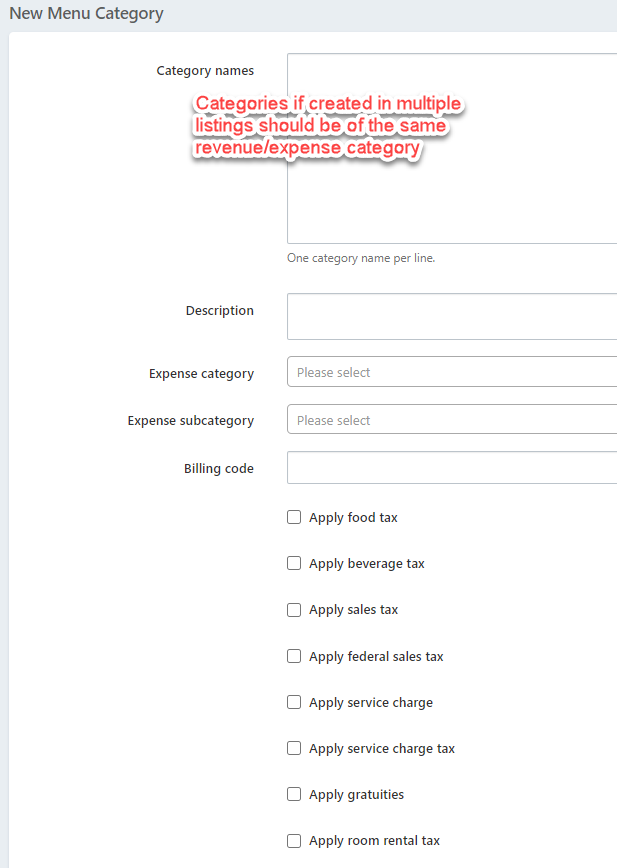
Enter Your Category Name. NOTE: if you want to create multiple categories, only add those of the same Expense Category
Enter optional short description
You Must select an Expense Category for the items in the group. (If no Expense Category is selected, the menu item will not print on the BEO)**
Select an optional subcategory
Optional - enter a billing code (ie - G/L code or department code used for posting in your PMS. Posting Codes will appear on the banquet check, and may be useful to the front desk posting charges to a group master folio)
Select the applicable tax and service charge for items in this group
Scroll down and click OK to save
**NOTE: Expense Categories are required:
Food
Beverage
Room Rental
Audio Visual
Labor
Other