Deleting Traces for Cancelled or Lost Bookings
LOST OR CANCELLED STATUS CHANGE AND DELETING RELATED TRACES/FUTURE TO DO’S
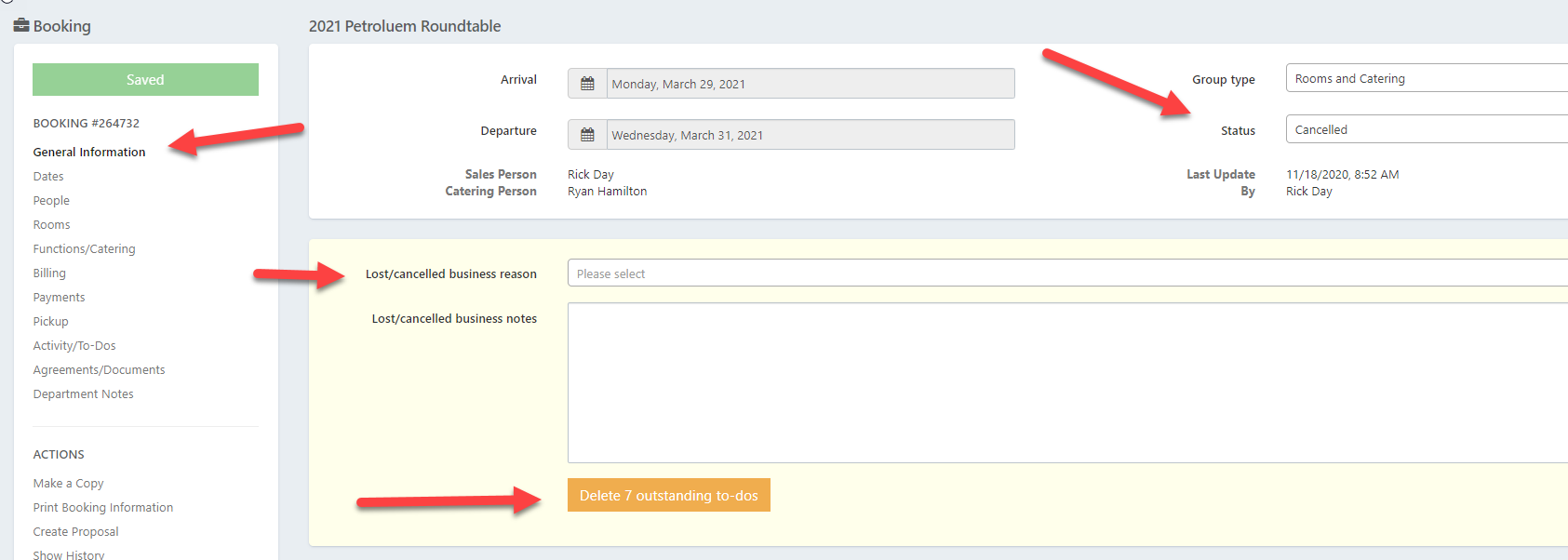
When changing a group status to Lost or Cancelled, please note the following to document the lost business reason with related notes, and also to remove any related booking traces from your calendar due to the group cancellation.
The Auto Traces set up in your database for your bookings will initially create the traces for the key service dates of your bookings based on the group status selected. Once a group cancels, you can also remove the group’s activities from your future to do’s.
If the group was to re-book for another date, then traces relating to the group’s new dates will populate when you copy and create the booking for the re-scheduled dates.
When the group cancels their booking:
Open the booking to update
Change the Group Status to Lost or Cancelled as appropriate
Click the General Information Tab on the left
In the yellow box, select your Lost Business Reason and add any notes
Click the Orange button to delete the related future activities from your calendar
Click Save on the right