Recording Business Turn Downs
TURNED DOWN BUSINESS
You can enter a booking into STS Cloud to generate a proposal, and create the room block and function space agenda. Many people with designate these type of Proposals as a Prospect Group Status. Groups in a Prospect status would show and hold formally any space, and then get a status change to Tentative when it is time to create a contract for the booking.
If a group is a Prospect Status and never goes to contract, you can track these groups as Turn Downs.
To update a group status to Lost or Turn Down:
Open the booking with the prospect status you need
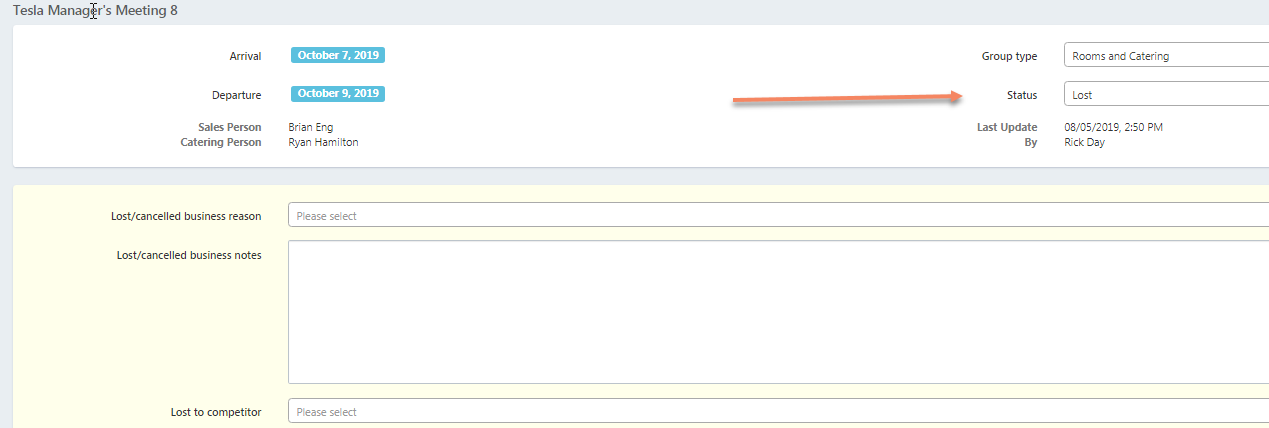
Change the Status from Prospect to Lost
The system will prompt a note to you to select a Reason for the Lost Business
Enter any notes for future reference
You can also define competitors in your settings and select a competitor to whom you may have lost the group
Click the green Save Change button on the left
NOTE: The Lost Business Reasons and the Competitors list can be updated within Utilities in Settings for Your Hotel Name